
Will Using Yoast Get You To No1 In Google? Want to know if Yoast SEO any good to help your website gain more visibility on the web?
Unfortunately, it is very unlikely to on its own. But, using Yoast or similar tools, does have its benefits.
My Yoast SEO Traffic lights are Green, is that enough?
Having green smiley faces on Yoast’s SEO or Readability isn’t sufficient to get you to the top of Google search results. What it does do, is check the fundamentals of SEO for that page have been addressed. Think of it as a great starting point, however, there is much more to getting your website to rank in search engine results pages (Serps) than having green lights and smiley faces in your SEO website plugin.
What those little green smiley faces won’t do, is compare your page to your competitors or those websites that rank highly in search engine results already. You could have completed every action in the Yoast checklist, but if your competitor has also done that, Google has to find other ways to distinguish you both.
How will using Yoast help me?
Using the Yoast tools, even just the basic free version, will help you understand what Google is looking for. Yoast will help focus you when you are writing page content, or reviewing your pages with SEO in mind. For these reasons, using Yoast’s SEO plugin can be a useful tool for those with little knowledge of SEO.
Yoasts tool will give you a checklist of actions, that once completed will give you a visual score of how well-optimised your content is for SEO. This visual SEO score is in the form of traffic-light coloured smiley or sad faces. Green Smiley, you are doing well. Amber face, you have work to do. Red Face, have you even started SEO optimisation yet!
What is Yoast’s SEO focus keyphrase
Ideally, before writing any content for a website page, you should aim for what keyword you want that page to rank for. This keyword would be your focus keyphrase.
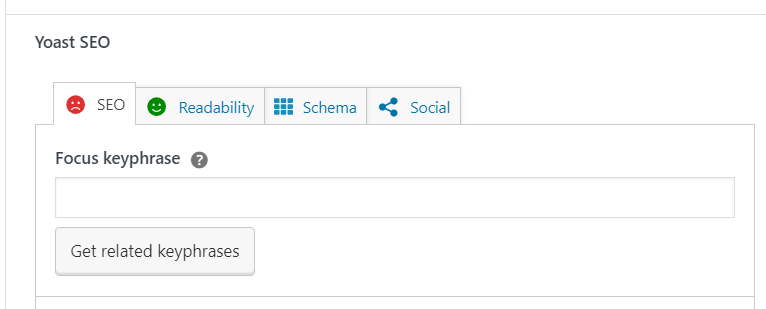
Think about exactly what the most common phrase is that people will search for in order to find your webpage.
We recommend completing keyword research, and not taking an educated guess on this. It is very common for business owners and employees, to be very confident that they know the phrases their customers would use, however, in reality, they are often far from the mark. Taking the time to research the topic and common keywords and phrases, reduces the risk of your page or blog post never seeing the light of day in search engines!
Yoast recommends incorporating your focus keyphrase 3 times throughout the text
Additional, related keywords and synonyms
It is best practice to incorporate additional but related keywords for your chosen focus Keyphrase. Synonyms ( words or phrases that mean the same) and topic related keywords will help your content dramatically. Not only will they potentially enable that page to rank for a number of keywords or phrases, but they will make your content so much more interesting and easier to read.
You do not need to have the premium Yoast to incorporate these words and phrases throughout your content. Remember that Google and search engines don’t care if you have paid Yoast for a premium package. If the information is on the page, it is on the page. What reminded you to incorporate it is not their concern. Search engines simply care that readers easily understand and find value in your website’s content.
How to write an SEO Title Tag
Your SEO Title will be set as default in Yoast, however you can change this, and probably should in many cases.
Readers will see your SEO title in the search results, and it essentially serves as your headline to help your website stand out. It should incorporate the main SEO keyword or phrase and be catchy, enticing readers to click on your site.
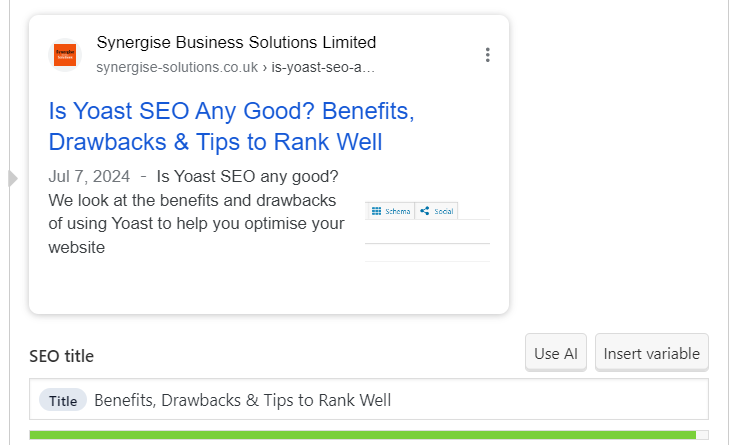
Yoast automatically includes the website name in the title, but you could better use this prime advertising space by incorporating benefits or reasons for readers to click the link. Since SEO title length is limited, practice being creative to convey your point quickly and concisely.
How to write your Meta Description in Yoast
The Meta Description Tag in Yoast will generate the text that is beneath the SEO title in search results ( see the image above, in our SEO Title description).
Yoast will encourage you to include your focus keyphrase at the start of the meta description but we wouldn’t worry too much about its positioning. What is important, is that your description is an accurate reflection of the content, and like your title, it should give readers a reason to visit your site for more information.
Outbound Links
Outbound links are links from your website content to an external website. While this can add value to your site when used correctly they can also do harm. By harm, we mean that they can draw website traffic away from your site, reducing your opportunity to gain a sale or a website lead.
Use outbound links with caution. Outbound links should open in a new tab, this enables readers to look at the content, but leaves your website open so they can’t disappear down a “rabbit hole” and forget about you!
We would suggest unless you have a good understanding of SEO and of user behaviour, then you can safely leave outbound links off your website content for the majority of your text. We certainly wouldn’t only add them to tick Yoast’s Outbound Links task, you can still get a satisfyingly green smiley face without an outbound link in site!
Inbound Links
Now these do matter!
Inbound links will help direct your visitors to further reading or ideally to more relevant content to help them make a decision to purchase or enquire. They will also, help show search engines such as Google or Bing, how your web pages and content are related to each other, what is important and how much of an expert you are on topics.
A page on its own that has no incoming internal links will not be seen as important in the eyes of search engines. A page with many internal links will be seen as an authoritative page on that topic. Internal links show how pages are all interconnected.
Add links using buttons or hyperlinks in your copy to other content that readers will find helpful. Look through this article, and you will see we naturally link to further content on related topics within the text.
Images
Create a visually interesting website page or article by incorporating photos, images, and graphics. Images draw attention, speak a thousand words and are great for search engine results when used correctly.
Compress images to keep them small and quick to load. Use Alt tags and naming conventions that incorporate your keywords where possible. And, avoid stock imagery if possible, so that your images are unique. Final word on images, make sure you have the right to use them in your marketing. Do not be tempted to right click and save an image of a website to use on your own!
General Content Tips
Aim for 400 words or more as the bare minimum, and break up the text using relevant headings.
Headings help website visitors quickly scan content to find the information they need and are useful for SEO searches. Headings that match search queries are more likely to appear in the search results for that query.
Is Yoast SEO any good…It is a great starting point
Yoast is perfect for beginners to SEO. It will give you a good basic checklist of the key things to consider. And, the little green smiley faces are great for a little dopamine kick!
What Yoast isn’t going to do is your homework for you. Yoast doesn’t analyse the depth or relevance of your content or take into account your competitor’s site or content. So while you may be green in yoast you may have very little chance of ranking for your chosen search term.
There are many factors that play a part in if you will rank and where you rank in search results. If you are struggling to get your website to rank higher in Google and would like a helping hand at an affordable rate then let’s chat. Your initial call is FREE, so you have nothing to lose and a lot of ranking positions to gain.